OpenAI Ads Manager: Step-by-Step Setup, Campaigns and Reporting (2026)

Philip Mohr · Co-Founder & COO
· 15 min read
OpenAI Ads Manager is the self-serve dashboard at ads.openai.com where you create an advertiser account, build campaigns and read the results of ads that run inside ChatGPT. The settings you can't undo are the part worth slowing down for. This walkthrough covers each screen in order, with the gotchas we'd want flagged before spending the first $25.
What to know before your first ChatGPT ad goes live
Three account fields (country, currency and time zone) and every campaign's objective are permanent, so decide them first. The minimum daily budget is $25 in USD accounts. That "daily" budget is really a 7-day average, so one day can spend up to $50. Spend shows up 7 to 8 hours late and conversions 24 to 48 hours late. Since October 29, 2026, OpenAI also rewrites your ad text by default unless you opt out.
What is OpenAI Ads Manager?
OpenAI Ads Manager is OpenAI's self-serve tool for buying ads in ChatGPT, still labeled a beta in the product. Ads appear below ChatGPT's answers, and OpenAI doesn't show them to Plus, Pro or Business users, or to anyone it believes is under 18. On October 21, 2026, OpenAI said more than 100,000 advertisers had run campaigns and that ChatGPT Ads was available in 89 countries.
You can buy the same inventory three ways: the Ads Manager web app, OpenAI's ChatGPT Ads Manager plugin, or the Ads API. This guide follows the web app, because billing and verification live there whichever route you pick. For the bigger picture on formats and pricing, start with our guide to advertising on ChatGPT.
What you need before you sign up
Have these ready and setup goes in one sitting:
- An OpenAI login (the one you use for ChatGPT works)
- Your business's legal name and the brand name you want shown on ads
- A credit card and a billing address
- A square logo
- Landing pages that don't block OpenAI's crawlers (OAI-AdsBot and OAI-SearchBot) in robots.txt, which OpenAI requires for ads to serve
Step 1: Set up your advertiser account
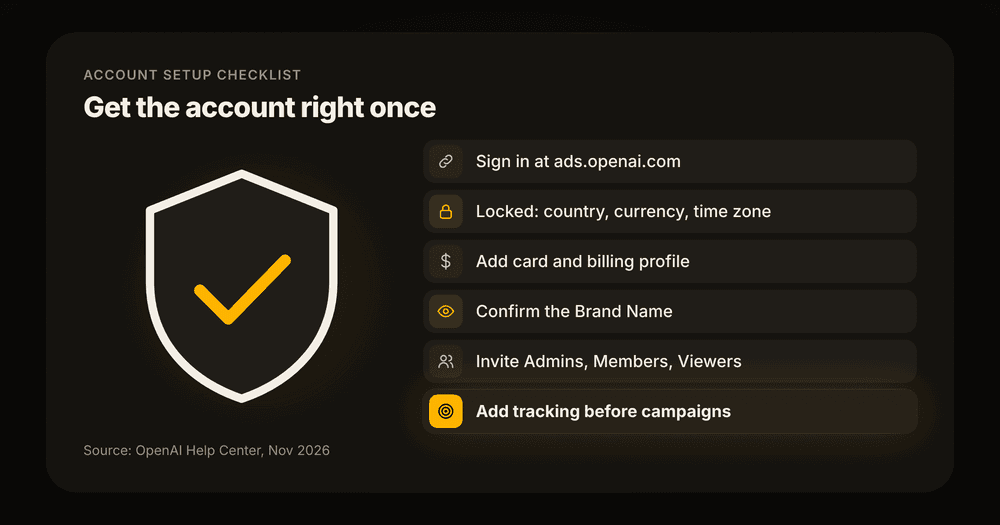
The advertiser account holds your billing, your brand identity and your team. Here is the sequence, using the labels OpenAI's account setup guide uses:
1. Go to ads.openai.com and select Login or Sign up. 2. Choose a path. You can enter your website URL and let Ads Manager draft a first ad and campaign, or skip that and go straight to the dashboard. 3. Enter your advertiser name and account details. Check country or region, currency and time zone twice: none of them can be changed after the account exists. 4. Open Billing and add your card and billing profile. Adding the card can trigger a temporary authorization hold, separate from ad charges. 5. Go to Settings → General and review your logo plus three names: Account Name (internal only), Brand Name (shown on your ads) and Legal Name (used for billing and verification). 6. Go to Settings → Users → Invite to add teammates as Admin, Member (creates and manages campaigns) or Viewer (read-only).
Verdict: skip the website-URL shortcut on your first account. It builds a campaign before you've set up tracking, and that campaign's objective is locked from then on.
Watch out: changing the Brand Name later triggers a brand review and pauses ad serving until it's approved. Changing the Legal Name restarts business review. Pick both now.
Step 2: Set up conversion tracking first
Conversion tracking in OpenAI Ads Manager has to exist before you can choose the Conversions objective, and you can't switch a campaign to that objective later. So tracking comes before the first campaign, not after.
OpenAI's conversion measurement guide works in four moves:
1. Create a data source under Tools → Conversions. 2. Send events with the OpenAI Pixel (browser), the Conversions API (server) or both. 3. If you use both, give each conversion the same event ID so OpenAI can deduplicate it. 4. Keep the oppref click parameter intact through redirects. OpenAI appends it to your landing page URL and uses it to attribute the conversion.
Only standard events can be optimization goals. Custom events can be reported but not bid toward. Automatic advanced matching is on by default for new web pixels. OpenAI says the pixel hashes form data such as emails in the browser with SHA-256 and doesn't send the raw values. You can switch it off under Tools → Conversions → Data Source → Edit pixel.
Step 3: Create the campaign
A campaign in OpenAI Ads Manager sets the objective, budget, schedule and targeting that its ad groups share. Select Create → Create campaign. The structure has three levels.
These are the campaign fields, per OpenAI's campaign setup guide:
| Field | What it controls | Can you change it later? |
|---|---|---|
| Campaign title | Internal name | Yes |
| Objective | Views (CPM), Clicks (CPC) or Conversions | No |
| Conversion event | The standard event a Conversions campaign optimizes toward | No |
| Budget | Daily or campaign total | Amount yes; total can switch to daily, not back |
| Start and end dates | When ads can run | Yes |
| Countries | Where ads can appear | Yes |
| Platforms (optional) | Android app, Android web, Desktop web, iOS app, iOS web | Yes |
| Custom audiences (optional) | Include or exclude uploaded lists | Yes |
Which objective should you pick?
The objective sets what you pay for and what the system optimizes toward. Views bills per 1,000 impressions. Clicks bills per valid click. Conversions optimizes toward your chosen standard event and still bills per click (oCPC) or per 1,000 impressions (oCPM). You never pay per conversion.
Verdict: Conversions with click billing, if your tracking already records real conversions. Otherwise Clicks. Views is for awareness budgets you won't judge on sales. Because the objective is permanent, a wrong pick means rebuilding the campaign, and Clone Campaign only works for a different objective.
How the daily budget actually spends
A daily budget in OpenAI Ads Manager is an average over a 7-day week that runs Sunday through Saturday in your account's time zone. Any single day can spend up to 2x the daily figure. The week can't go over 7x. If the weekly allowance runs out early, the campaign can stop until the next week while still showing as active.
| Billing currency | Minimum daily budget |
|---|---|
| USD | $25 |
| CAD | C$25 |
| AUD | A$25 |
| GBP | £15 |
| EUR | €15 |
Source: OpenAI's minimum daily budget table, which lists 37 currencies.
Location, platform and audience targeting
Country targeting decides where ads can appear, and OpenAI notes you must explicitly include the United States to target it (excluding everyone else isn't enough). Outside product-feed campaigns you can narrow to states, cities, markets and postal codes where available.
Two limits catch people out. Some new self-serve accounts can only advertise in their home country until identity verification and a spend threshold are cleared. Custom audiences need at least 25,000 matched users to include. OpenAI also says to avoid them for the EEA and Switzerland, where ads personalization isn't available.
Worked example: what a $25 daily budget can spend
We ran OpenAI's published pacing rules on the minimum USD budget. This is arithmetic from the campaign setup guide, not account data.
| Scenario | Daily budget $25 |
|---|---|
| Most it can spend on any one day | $50 (2x) |
| Most it can spend in a Sunday-to-Saturday week | $175 (7x) |
| Average per day across a full week | $25 |
| Quiet Monday spends $10 | The unused $15 can carry into later days that week |
The practical read for a small business: budget for $175 a week, not "$25 a day", and don't panic when Tuesday shows $48. If a fixed monthly cap matters more than smooth delivery, use a campaign-total budget instead. It is the stricter control, and you can still move to daily later.
Step 4: Build ad groups with context hints
Ad groups in OpenAI Ads Manager hold the bid strategy, the context hints and the ads. Context hints replace keywords. They describe the conversations, needs and situations where your ad is relevant, and OpenAI calls them broad thematic signals, not exact-match targeting.
OpenAI's context hints guide suggests covering three angles:
- What: a product feature, service, price point or service area
- Who: the customer need or circumstance it suits
- When: the situation or decision where it helps
Write each hint as one natural phrase about one idea. "Emergency plumber available on weekends in Austin" beats "plumber, emergency, Austin, 24/7". Keep one theme per ad group, and split groups when the landing page or message changes.
For bidding, Maximize results is the default for eligible new ad groups. It adjusts bids to get as many clicks or conversions as the budget allows. Manual: Max bid caps your CPM or CPC instead.
Verdict: start on Maximize results, then switch to Manual: Max bid once you know what a click is worth to you. A cap you set without data is a guess with a dollar sign on it.
Step 5: Write the ads
Each ad in OpenAI Ads Manager is a headline, a description, an optional image and one landing page, shown with your brand name and logo. Since October 26, 2026 you can choose Single image or Multiple images under Ad format; multi-image is an open beta.
| Element | Limit | OpenAI's recommendation |
|---|---|---|
| Headline | 50 characters | 16 to 24 |
| Description | 100 characters | 32 to 48 |
| Image | Square PNG or JPG, up to 1200 x 1200 | Optional |
| Landing page | Valid, reachable, crawlable | The most relevant page, not the homepage |
Source: OpenAI's campaign launch guide.
OpenAI recommends several title and copy variations per offering, because more variety gives the system more conversations to match. Three or four ads per ad group is a sensible start for a small account.
Watch out: since October 29, 2026, creative enhancements are on by default for new and existing campaigns. OpenAI may rewrite headlines and descriptions, translate them, resize images and change the destination URL, and these versions can run without your approval. If your copy has legal wording or regulated claims, opt out under Manage settings before launch.
Step 6: Launch and confirm it's serving
Ads in OpenAI Ads Manager go live only after they pass OpenAI's policy review. Billing, account readiness, campaign status, budget and schedule all have to line up too. If a campaign shows active but isn't delivering, OpenAI's checklist is:
1. Verification and billing are complete. 2. The campaign and its ads are set to active. 3. The campaign dates include today. 4. Every ad has finished review. 5. The weekly budget allowance isn't used up, and at least one eligible country is still targeted.
One trap on the first campaign: start and end date options may not appear until after you publish. OpenAI warns against publishing just to reach them, since ads could start before your schedule is set.
How do you read reporting in OpenAI Ads Manager?
Reporting in OpenAI Ads Manager opens in a table view on the Campaigns, Ad groups and Ads pages. The metrics are impressions, clicks, spend, CTR, average CPC, average CPM and conversions, plus Order Created Sales and Order Created ROAS if you send order events. All of it is in OpenAI's Measure Results guide.
The controls worth knowing:
- Edit columns (three-dot menu): add individual conversion events, view-through conversions and Conversions (by conv. time).
- Segment: break results down by Device, Country or Platform.
- View insights (chart icon): trend impressions, clicks and spend over a date range.
- Export: the current table view, cumulative values for selected rows, or daily values.
- Attribution windows: 7, 14 or 30 days after a click, and 0 or 1 day after a view. Changing them affects reporting only, not bidding or billing. Attribution is last-touch.
How fresh is the data?
The numbers in OpenAI Ads Manager arrive on different clocks, which matters more than any single metric in week one.
| Metric | Typical delay |
|---|---|
| Impressions, clicks, CTR | About 15 minutes |
| Spend | About 7 to 8 hours |
| Average CPC and CPM | Updates once spend settles |
| Attributed conversions | 24 to 48 hours |
Pro Tip: judge yesterday's cost per conversion no earlier than the day after tomorrow. A Thursday read of Wednesday's CPA compares full spend with half the conversions, and the campaign looks worse than it is.
Can Claude or ChatGPT manage your ChatGPT ad campaigns?
Yes, with different limits depending on the route. OpenAI's own ChatGPT Ads Manager plugin works inside ChatGPT and Codex and can create and edit campaigns. HYPD's open-source OpenAI Ads MCP brings the same account data into Claude, read-only. We build one of these, so weigh our verdict accordingly.
| Option | Where it runs | Can it change campaigns? | Best for |
|---|---|---|---|
| Ads Manager web app | Browser | Yes | Billing, verification, bulk upload |
| ChatGPT Ads Manager plugin (OpenAI) | ChatGPT, Codex | Yes, after you confirm a preview | Building and editing from a chat |
| OpenAI Ads MCP (HYPD, open source) | Claude Desktop, Cursor, VS Code | No, read-only | Analysis in Claude, alongside other channels |
The ChatGPT Ads Manager plugin
The plugin can draft ads from a web page, build campaign structure, compare performance and run daily or weekly reviews. It shows the landing page, copy, budget and targeting for approval before creating anything, and its reviews are recommendation-only. Identity verification, billing and tax stay in the web app. Without a date range it defaults to the trailing seven completed days.
Verdict: if you work in ChatGPT and want to create and edit campaigns from a chat, use OpenAI's plugin. It does more than our server today.
HYPD's OpenAI Ads MCP
The OpenAI Ads MCP behind this walkthrough is a free, MIT-licensed server with 11 read-only tools that wrap OpenAI's Ads API. It runs locally through npx and needs an API key from Settings in Ads Manager, one per ad account (setup is on GitHub). The build story covers why it's read-only for now.
It is separate from the main HYPD connector. HYPD is the AI co-pilot for performance marketers: it connects Google Ads, Meta Ads, GA4, Merchant Center, Search Console, Microsoft Ads and LinkedIn Ads to Claude and ChatGPT through MCP, read-only by default, EU-hosted and GDPR-compliant. Run both in Claude and one chat can read ChatGPT ads next to Google and Meta.
Verdict: pick the MCP when the job is reading, not changing. That covers the Monday check and the cross-channel question of where the next $500 should go.
Here is a weekly check prompt to run with the OpenAI Ads MCP connected:
Using the openai-ads tools, pull last week's spend, clicks, CTR and conversions by campaign and ad group. Flag any ad group whose CTR is less than half the account average, and any campaign that spent over 80% of its weekly allowance before Friday. Exclude the last two days from any cost-per-conversion figure, because conversions lag 24 to 48 hours.
Where Ads Manager (and AI) still fall short
OpenAI Ads Manager is a beta, and some gaps change how far you can trust the numbers.
- Attribution is last-touch. Someone who sees your ChatGPT ad, then searches your brand on Google, gets credited to Google. ChatGPT will look weaker in its own reporting than it is.
- Context hints don't guarantee anything. OpenAI says plainly they inform relevance and don't promise delivery for any conversation. You can't see which conversations triggered an ad, which makes ad group tuning slower than keyword work.
- Creative enhancements mean copy you didn't write. That's fine for an e-commerce store. A financial or health advertiser should turn it off.
- AI reads lagging data with total confidence. Ask any assistant, ours included, to name the best ad group over the last seven days. It will name one, even when the final two days hold half the conversions they'll eventually show. The prompt above excludes them for that reason.
- No assistant knows your margin. A plugin review can flag a $9 CPA. Only you know whether $9 is a bargain or a loss.
The decision
For a first campaign, set up tracking before anything else and start with Clicks or Conversions. Budget for the weekly maximum, not the daily figure, and wait 48 hours before reading cost per conversion. Decide on creative enhancements before launch rather than finding out from a translated headline. Then run the analysis wherever you already work: the plugin in ChatGPT, or the free MCP in Claude.
FAQ
OpenAI Ads Manager has no account-level minimum spend, but each campaign needs a minimum daily budget. It is $25 for USD accounts, £15 for GBP and €15 for EUR. Because daily budgets average over a week, a $25 campaign can spend up to $175 in a week.
No. The objective is permanent once an OpenAI Ads campaign is created, and so is the conversion event on a Conversions campaign. To change it you build a new campaign, and Clone Campaign only lets you copy into a different objective or billing model.
Impressions, clicks and CTR in OpenAI Ads Manager refresh about every 15 minutes. Spend runs about 7 to 8 hours behind. Attributed conversions can take 24 to 48 hours, so recent cost-per-conversion figures look worse than they end up.
Claude can read ChatGPT ad campaigns through HYPD's free OpenAI Ads MCP, which is read-only and can't create, edit or pause anything. To create or edit campaigns from a chat, use OpenAI's ChatGPT Ads Manager plugin in ChatGPT or Codex, which asks you to confirm each change.
ChatGPT ads are shown to users on the Free and Go plans. OpenAI doesn't show ads to Plus, Pro or Business users, or to users it believes are under 18. Ads appear below ChatGPT's answers and are labeled as ads.
Connect the free OpenAI Ads MCP read-only and run the weekly check prompt above on your own account: OpenAI Ads MCP.